Invoice PDFs · Step-by-step guide
How to bulk download Stripe invoice PDFs
This guide shows you how to use Bulk Invoice Vault to filter and bulk download Stripe invoice PDFs as ZIP files, without opening each invoice individually. Use free small-batch downloads, or gather a larger selection with Pro without repeating batches.
Last updated · By QiQi Forge, makers of Bulk Invoice Vault
Install on Stripe ↗1. Decide which invoices to download
First, decide whether you need a selected set of invoices or all invoices matching a date range and other filters. For a selected set, filter the invoice list, select the records you need, and download them in small batches for free, including ZIP downloads. The app prepares your selected files first; check progress and download them from Export History when ready.
If you need all matching invoices—for example, several months of invoice PDFs across customers—Pro gathers them without making you select and download them batch by batch. Pro costs $10/month. Large downloads may be split into multiple ZIP files, rather than one ZIP for the entire export.
2. Install and open the workspace
Install Bulk Invoice Vault from the Stripe App Marketplace for the Stripe account whose invoices you want to download. Open the app in your Stripe Dashboard, then follow its download or bulk export link.
The link opens the connected web workspace in a new browser tab and signs you in automatically. You do not need a separate password. Choose Download Invoice PDFs to review and select individual invoices. For larger downloads, use Bulk Export PDFs; upgrade through Plans if needed.
3. Filter your invoices
On Download Invoice PDFs, choose an invoice creation date range, then narrow the results by customer or invoice status. Select Search to see matching invoices. You can also filter by amount or due date.
For a monthly handoff, check that you are filtering the intended creation dates. Invoice creation dates and due dates describe different things; use the fields that match the documents you need.
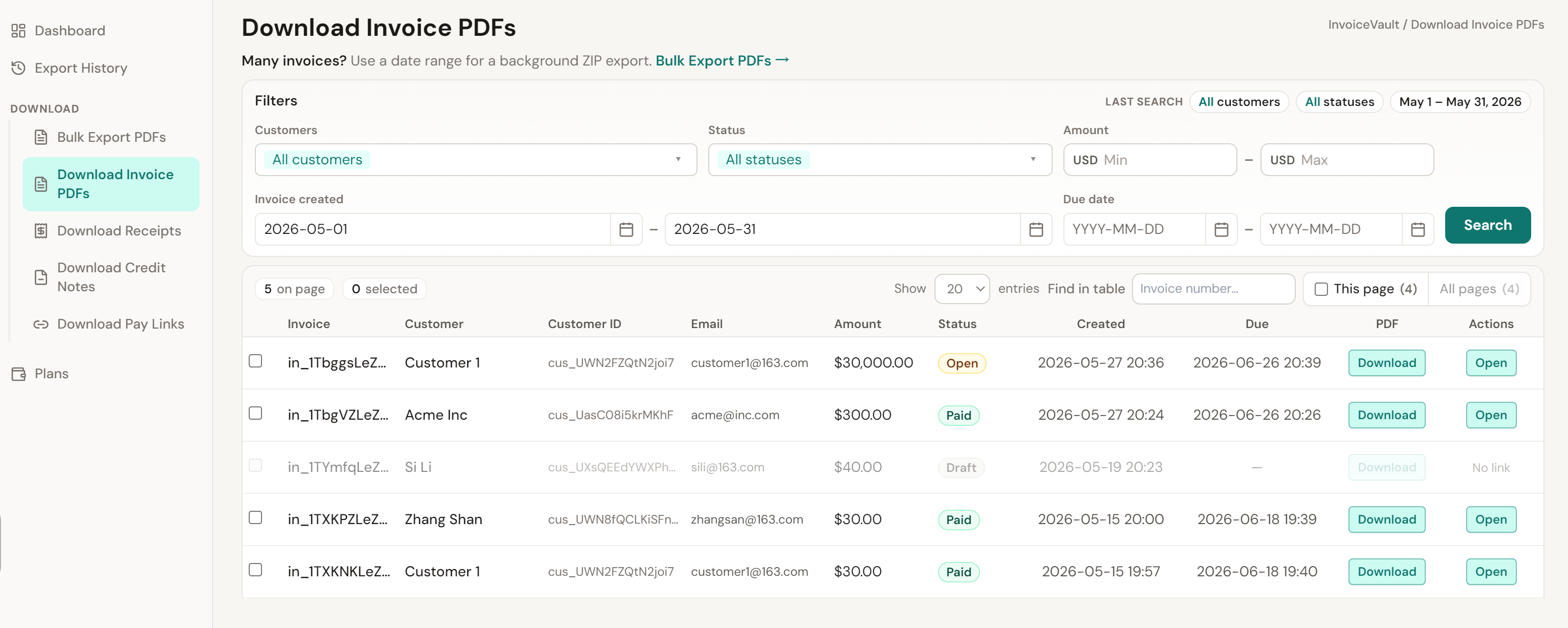
Review the results and confirm the account and filters before proceeding. Rows without an available PDF cannot be included in a PDF download.
4. Prepare your download
Free: download selected invoices
On Download Invoice PDFs, select the invoices you need using the row checkboxes. Choose the action to export your selection as ZIP, review the selection, and confirm Start export. Open Export History to check when the files are ready.
Pro: download all matching invoices
Open Bulk Export PDFs and set the date range, customer, status, and other filters there. Check these settings even if you have already searched on the invoice list page.
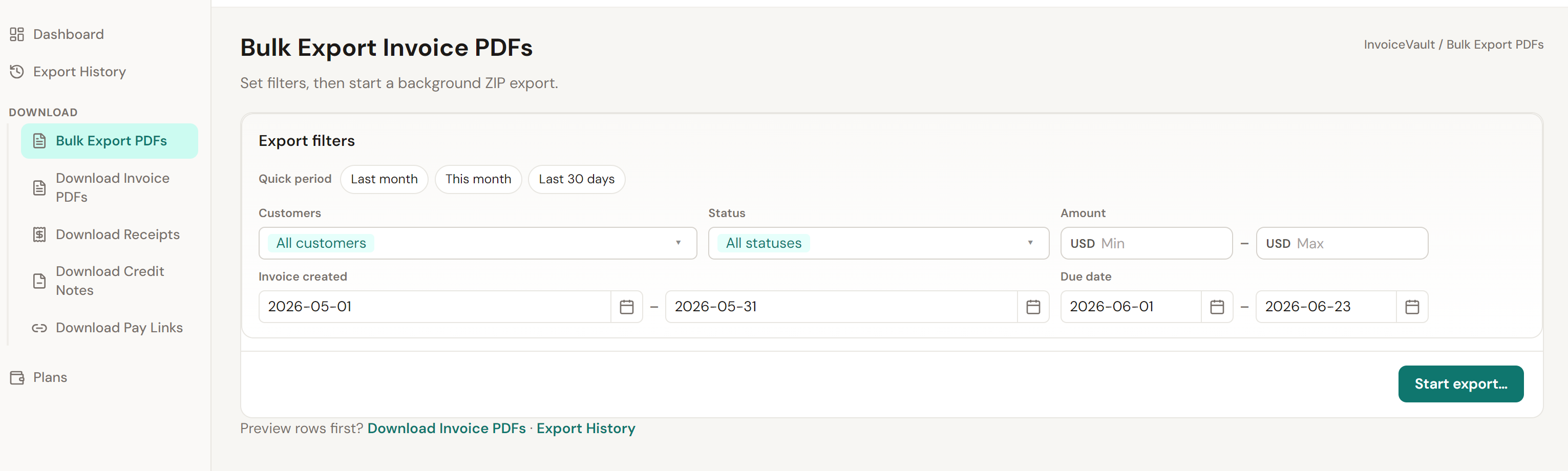
After choosing your filters, select Start export and follow the on-screen prompts. The app prepares the matching invoice PDFs for download.
Your files take time to prepare. Larger downloads may be split into multiple ZIPs. Open Export History to check progress.
Both free and Pro downloads take time to prepare. Pro saves repeated selection and small-batch downloads when you need a larger set of invoices.
5. Download your ZIP files
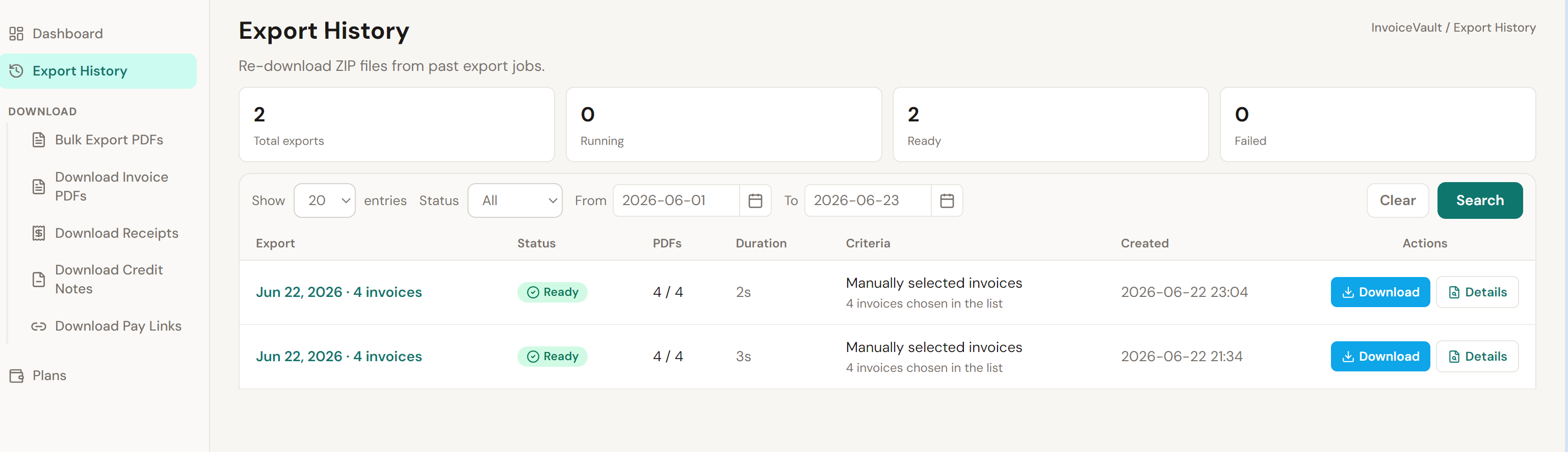
When your files are ready, open your export in Export History and download the available ZIP files. Download every part if your files are split into more than one archive.
Extract the ZIPs and check that the documents match the account and period you intended before sharing them with your accountant or saving them in your records.
Invoice PDFs or a CSV export?
A CSV contains rows of data for spreadsheet work. An invoice PDF is the individual invoice document. Choose PDF downloads when you need the documents themselves; a spreadsheet export is not a replacement for those files.
Get started with Bulk Invoice Vault
Start with the free tools for small batches. Choose Pro when gathering a larger selection will save you repeated small-batch downloads.