Install on Stripe
Open the Marketplace listing and install Bulk Invoice Vault for your Stripe account.
Install on Stripe ↗A shorter path to your PDFs
No separate account to create or password to remember.
Open the Marketplace listing and install Bulk Invoice Vault for your Stripe account.
Install on Stripe ↗In your Stripe Dashboard, open InvoiceVault from the apps drawer and follow a link into the web app. You’re signed in automatically, with no separate password.
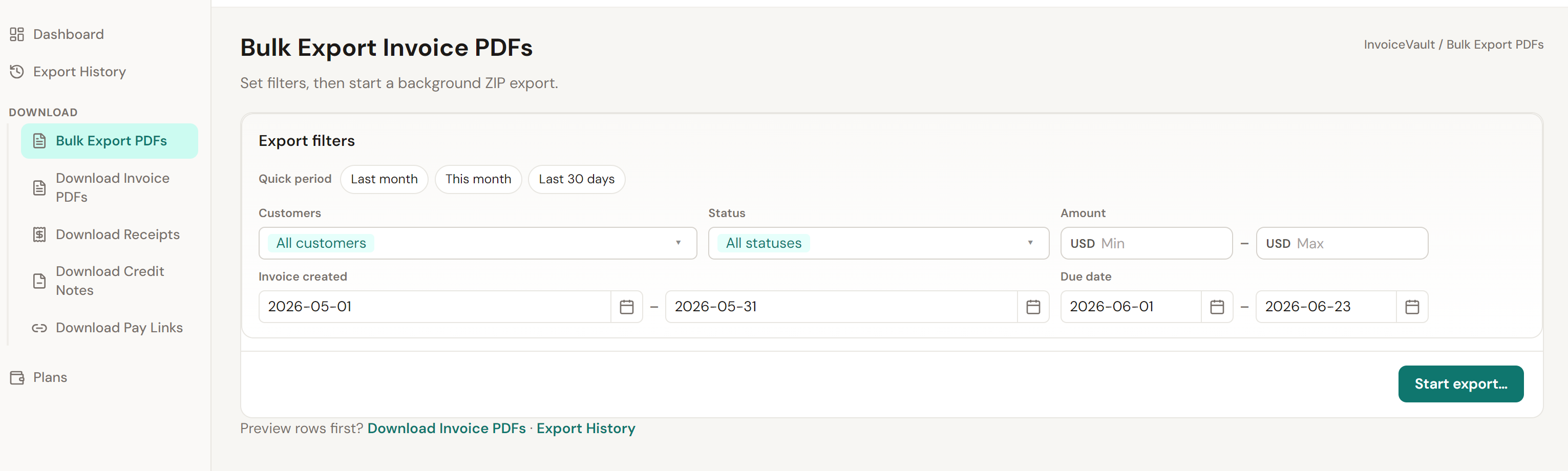
Download in small batches for free. For larger downloads—such as months of invoice PDFs across all customers—use Pro to gather all matching PDFs without repeating the steps. Download finished ZIP files from Export History.
Actual app screenshot · Pro bulk export
With Pro, gather matching invoice PDFs across your chosen date range and customers without repeating small-batch downloads.
No. Open InvoiceVault from the Stripe Dashboard apps drawer and follow a link into the web app to sign in automatically.
Open Export History to track progress and download each ZIP file. Download links expire after 15 minutes; finished ZIP files are kept for 15 days.
Yes. InvoiceVault exports official Stripe PDFs and reads your Stripe data when you search or export.
Read the documentation or contact help@qiqiforge.io.
Install free. Upgrade in the app when you need Pro.